Project Breakdowns · 6 min ·
Apex North Public Alpha Is Here: A Free GT7 Telemetry Dashboard and Race Engineer
Apex North is ready for its first public laps. Download the free Gran Turismo 7 desktop companion, explore your driving data, and help shape what comes next.
Our first public alpha is on the grid
On October 10, 2026, we released the first public alpha of Apex North. It is a desktop companion for Gran Turismo 7, built by Eleven North, with installers for Windows, macOS and Linux. If you have a PS5 or PS4 and a computer on the same network, you can try it today.
This release is a big step for our small Virginia studio. Apex North started with the questions that come up while driving: How much fuel is really left? Where did that lap lose time? Can I hear the useful information without looking away from the track? The alpha brings those answers into a live dashboard, local lap recordings and spoken race-engineer callouts.
It is early software. There will be rough edges, and we want real drivers to help us find them. The goal of this launch is to get the app into your hands, hear what helps during a race, and improve it with the community.
What does the GT7 telemetry dashboard show?
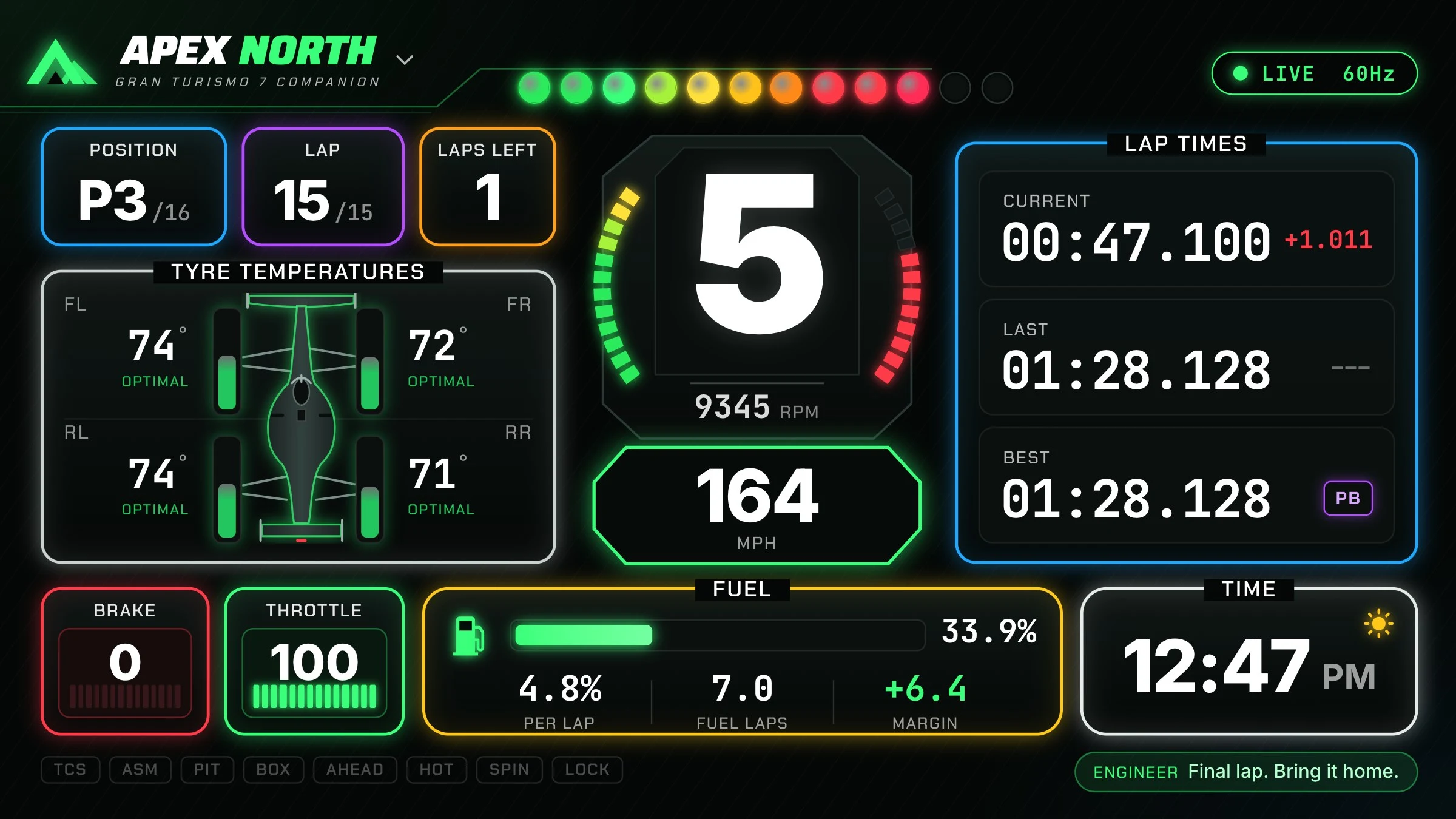
Apex North receives the telemetry stream from Gran Turismo 7 over your local network. The dashboard puts gear, RPM, shift lights, speed, throttle, brake and tyre temperatures beside lap timing, race position and fuel information. A live delta compares your progress with your best lap by distance around the circuit.
That makes the computer beside your rig useful while you are actually driving. You can watch whether a change is gaining time, keep an eye on fuel range, and see the engineer’s latest message. The interface is designed around quick glances, with a large gear display and clear groups for timing, tyres and fuel.
- Current, last and best lap times, plus live delta.
- Gear, RPM, shift lights and speed in mph or km/h.
- Four-corner tyre temperatures and driving inputs.
- Measured fuel use, estimated laps remaining and pit-window guidance.
The race engineer speaks while you drive
The alpha includes an offline voice engineer. It can call lap times, sector gains and losses, personal bests, fuel status, pit windows, tyre conditions and race-position changes. You can change the chatter level and switch callout categories on or off to suit the session.
The voice is bundled with the installer. You do not need an AI account, a cloud subscription or a separate Piper installation for the built-in callouts. The speech runs locally on your computer.
We want to be clear about what is shipping: the current engineer uses telemetry rules and offline speech. A conversational AI coach you can talk to is a longer-term goal. The alpha does not promise that future experience today. Fuel and pit guidance are estimates based on the available data, so your in-game situation still matters.
After the race, find where your next tenth is hiding
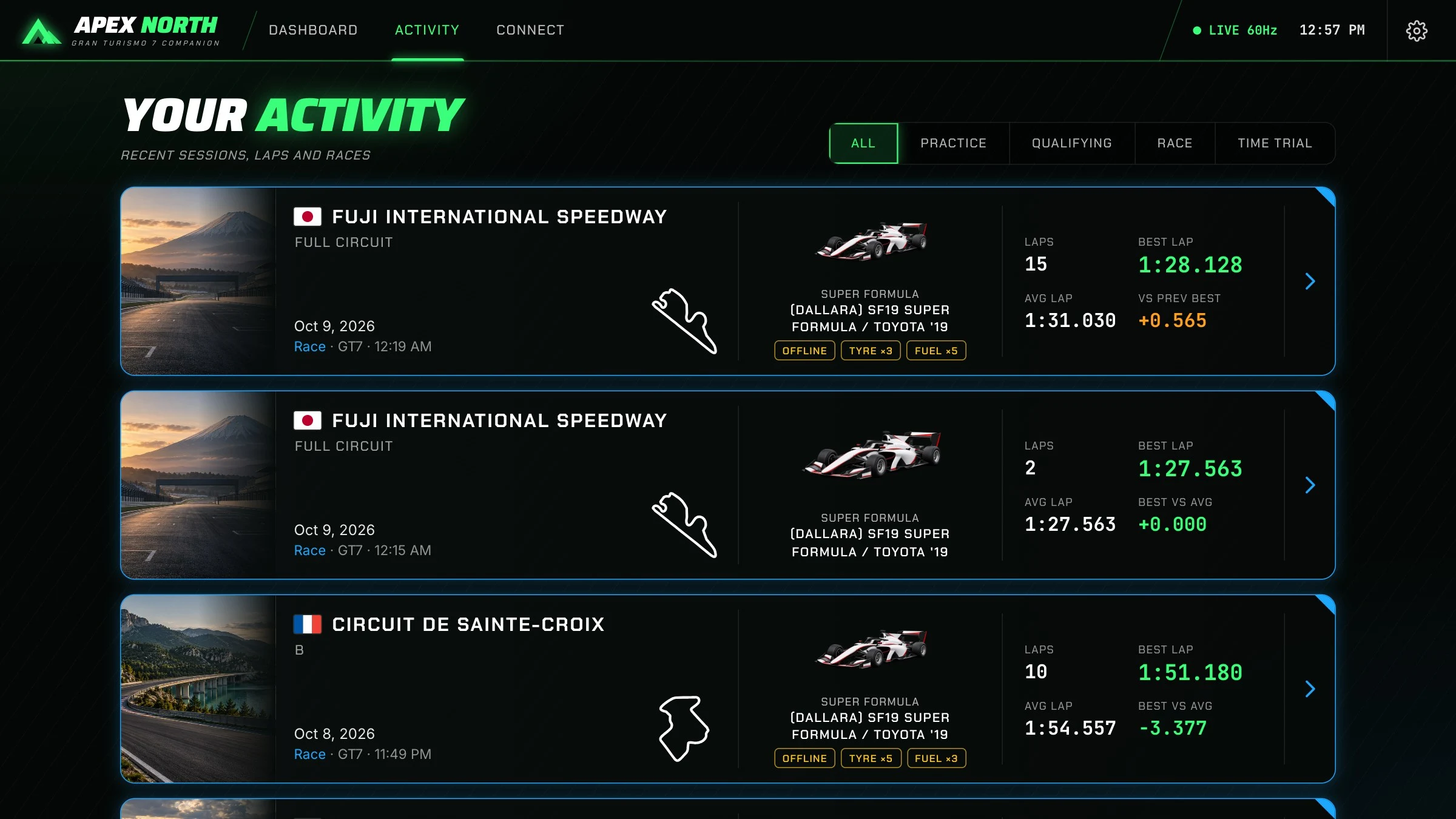
Apex North records laps automatically and stores sessions locally. The activity feed gives you a way back into a run, with track and car details, lap counts, and best and average times. The session view includes lap timing and five sector splits. You can also record conditions such as BoP, fuel multipliers and tyre wear so comparisons have useful context.
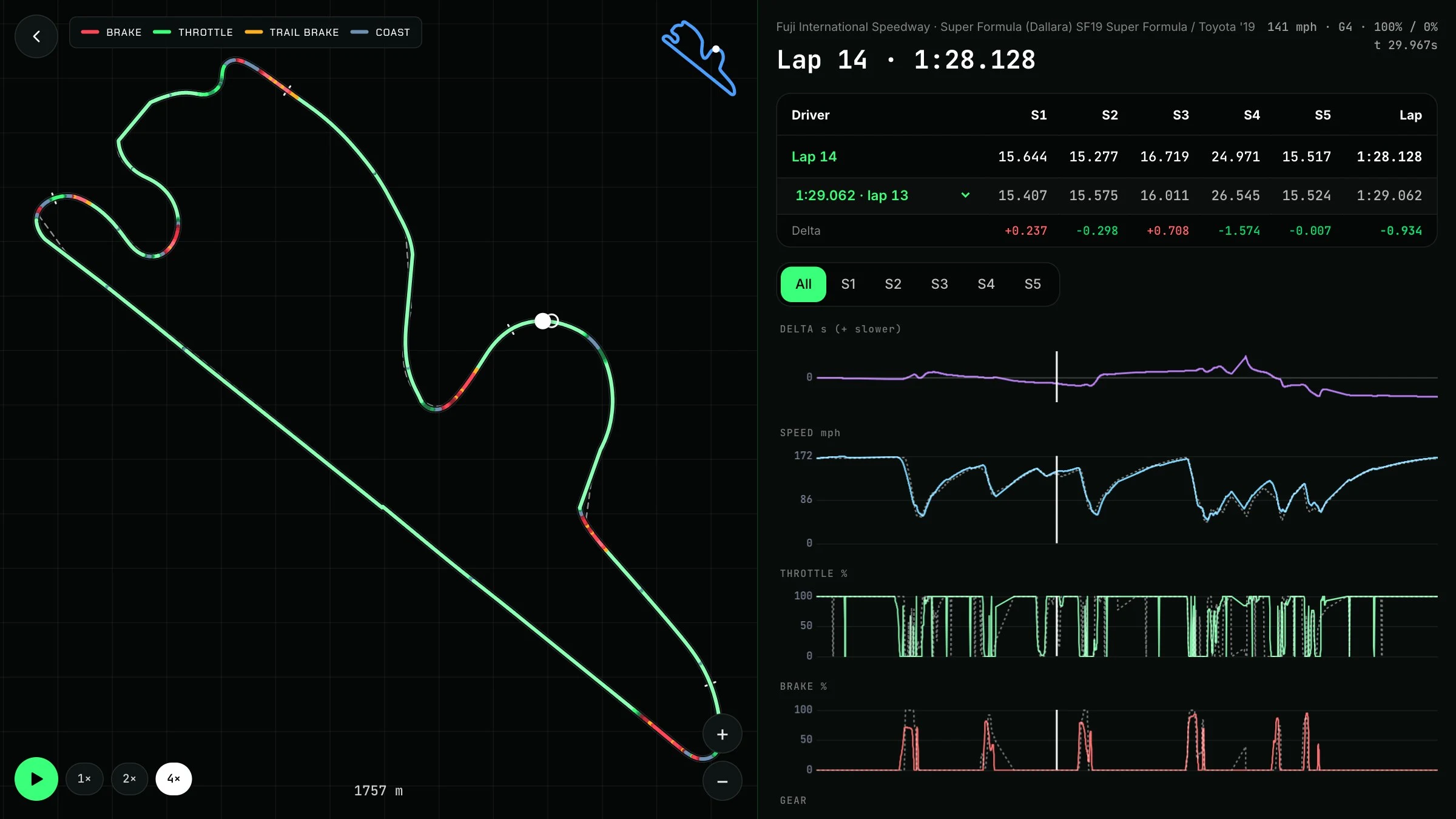
The lap analyzer is where a slower lap becomes something you can investigate. Compare two laps on the same track, replay the racing line on a map, and follow synchronized speed, throttle, brake and gear traces. The ghost comparison matches laps by position around the track.
Instead of only knowing that you were three tenths slower, you can look for the cause: an earlier brake application, a longer coast, a delayed throttle input or a different gear. The app gives you evidence to practice against; the driving is still yours.
Download the public alpha for Windows, Mac or Linux
The download page on Eleven North has direct links to the official v0.1.0 GitHub release assets. Choose the file for your computer, download it, then open it to install. Mac users have separate Apple Silicon and Intel builds. Linux users can choose an AppImage or a Debian package.
For a Mac, check Apple menu → About This Mac. A listed Apple M-series chip means Apple Silicon; an Intel processor means the Intel build. The early release is unsigned, so your operating system may display a security prompt. Read the platform instructions on the official repository before proceeding.
To connect, put the computer and PlayStation on the same network, start GT7 and get on track, then choose Find my PlayStation on the Connect screen. GT7 menus do not send telemetry. If discovery fails, you can enter the console’s IP address manually and check your firewall and local-network permissions.
You can also choose Try demo mode without a PlayStation nearby. It is a simple way to explore the dashboard before your next driving session.
Download Apex North for your computer
Public source, a clear license, and room to contribute
The ApexNorth source is now public on GitHub. You can inspect how it works, follow development, report bugs and suggest improvements. It is free for noncommercial use under PolyForm Noncommercial 1.0.0. Commercial use requires a separate license from Eleven North.
People often use “open source” as shorthand for a project whose code is on GitHub. Because this license restricts commercial use, source available is the more precise description for Apex North. We want that distinction to be easy to find before someone builds on the code.
You do not have to be a developer to help. A useful report can describe your operating system, release version, track and car, what you expected, and what actually happened. Feedback about missed callouts, confusing setup or awkward displays is especially useful in an alpha. Developers can start with the contribution guide.
Built by Eleven North, for the next lap
Apex North is one of the products we are building at Eleven North, a software studio in Virginia’s Shenandoah Valley. It brings together a Tauri 2 desktop app, a Rust backend, a React and TypeScript interface, local SQLite storage and offline voice.
This is also a practical example of the work we can do for clients: take a specific problem, design an interface around it, connect the data, and ship a working product. If you need a website, desktop application or custom software for your business, we would love to hear what you are trying to build.
For now, download the alpha, try a session, and tell us what you think. If the project helps you, sharing the launch page or starring the repository helps more drivers discover it. Thanks for being part of these first public laps.
Apex North alpha: quick answers
Is Apex North free?
Yes. The public alpha is free for noncommercial use. Commercial use requires a separate license from Eleven North.
Which platforms have installers?
The v0.1.0 release includes Windows 10/11, macOS Apple Silicon, macOS Intel, Linux AppImage and Linux .deb downloads.
Does Apex North need a PlayStation?
Live GT7 telemetry needs a PS5 or PS4 running Gran Turismo 7 on the same network as your computer. Demo mode works without a console.
Is the source on GitHub?
Yes. The source is public in ElevenNorthCo/ApexNorth under PolyForm Noncommercial 1.0.0. Its commercial-use restriction makes source available the precise license description.