Project Breakdowns · 10 min ·
Apex North: A GT7 Telemetry App, Lap Analyzer and Desktop Race Engineer
Apex North turns a laptop or desktop into a Gran Turismo 7 pit wall: live driving data, automatically recorded laps, synchronized lap comparisons, and a race engineer that speaks while you drive.
What is Apex North?
Apex North is Eleven North's desktop companion for Gran Turismo 7. It connects to a PS5 or PS4 on the same local network, displays live telemetry, records laps automatically, and provides spoken race-engineer callouts. The project uses Tauri and is being developed for macOS, Windows and Linux.
The idea came from a practical driving problem: a lap time tells you the result, but it does not explain where the time went. Was the slower lap caused by braking too early, hesitating on the throttle, a different gear, or a stint that was losing pace? Apex North brings the driving inputs, track position and timing together so you can investigate those questions.
This is an active development build, not a finished public release. The current implementation already includes the dashboard, session history, lap playback, comparisons and offline voice engineer. Conversational AI coaching, push-to-talk and league pit-wall features are future work. Here is what the app can do today, what the data can tell you, and how we are building toward that larger vision.

A Gran Turismo 7 dashboard beside your wheel
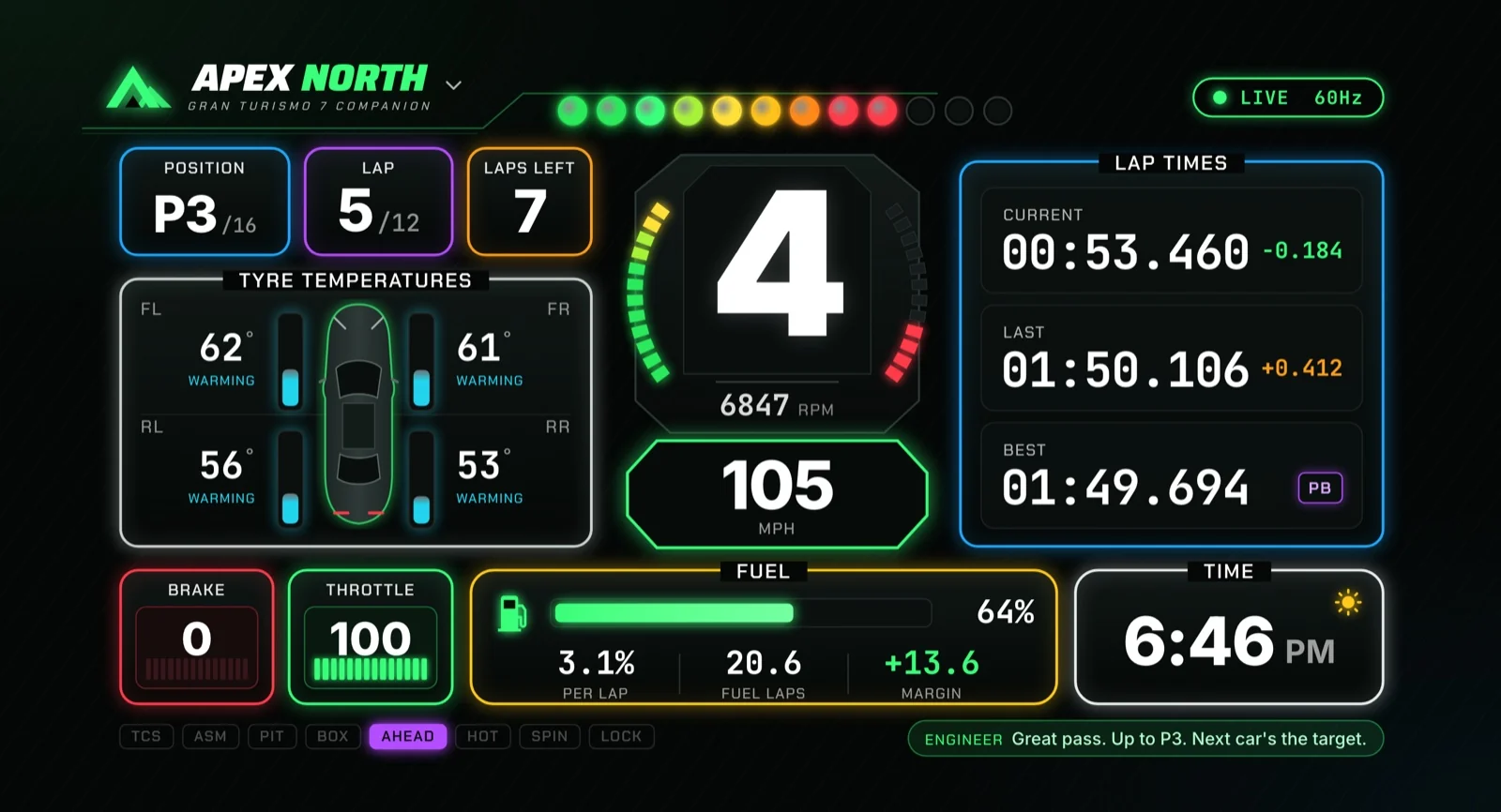
The live dashboard is designed to be read at a glance on a laptop or second screen. A large gear indicator sits beside RPM, shift lights and speed. The surrounding panels show race position, lap count, current and completed lap times, a live delta, four tyre temperatures, driver inputs and fuel information.
GT7 sends telemetry at roughly 60 packets per second. Apex North receives that stream locally and records lap samples at 30 Hz. The live delta compares your elapsed time with a reference lap at the same distance around the circuit, making it easier to see whether a change is gaining time before the lap ends.
Speed can be displayed in mph or km/h. Shift lights follow the car's reported rev-alert range, while status indicators highlight conditions such as traction control, hot tyres, wheelspin, lock-ups and an open pit window. The engineer's latest call is also visible, so useful information remains available when you miss a spoken message.
- Driving inputs: speed, gear, RPM, throttle and brake.
- Timing: current, last and best lap, plus distance-based live delta.
- Race context: position, lap of total, laps remaining and connection status.
- Stint information: tyre temperatures, fuel consumption, estimated fuel range and pit-window status.
How Apex North connects to your PlayStation
You do not need a separate telemetry sensor or extra racing hardware. The computer and console need to be on the same local network, and GT7 needs to be on track. The game does not send this telemetry while you are sitting in its menus.
The connection wizard can find the PlayStation automatically or accept its IP address manually. Apex North remembers the address for reconnecting later. Ethernet or a stable Wi-Fi connection helps keep the stream consistent; guest networks and router client isolation can prevent the devices from finding each other.
If discovery fails, check local-network permissions and the computer's firewall. The current implementation listens for incoming telemetry on UDP port 33740 and sends its heartbeat to the console on port 33739. A built-in demo mode exercises the dashboard and recording pipeline without a PlayStation, which is useful during development.
- Put your PS5 or PS4 and computer on the same network.
- Start a race, practice session, lobby drive or time trial in GT7.
- Open Connect in Apex North and choose Find my PlayStation.
- If needed, enter the console's IP manually and allow local-network access.
Automatic session history that keeps practice useful
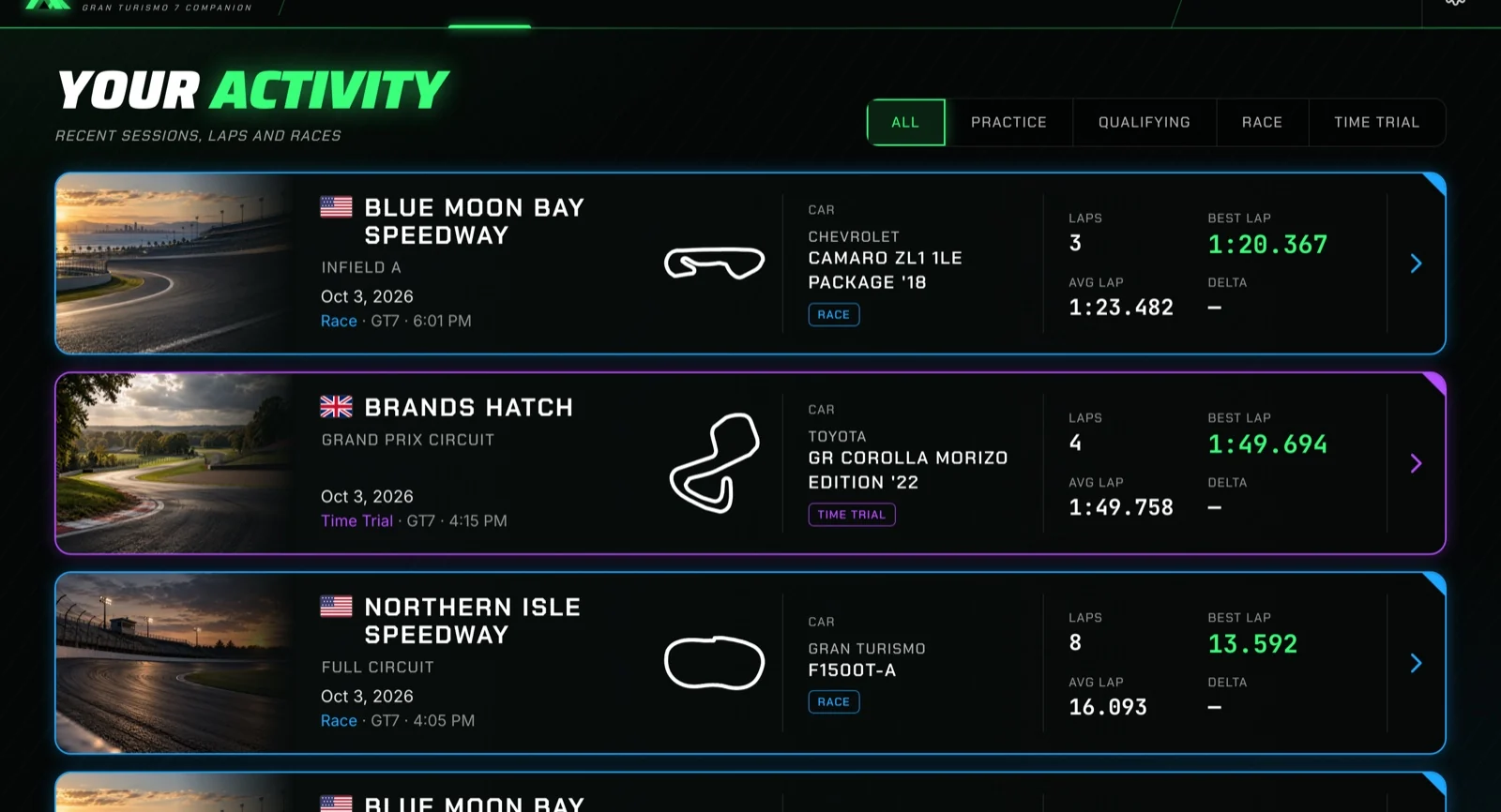
Apex North saves laps and sessions locally in SQLite. The Activity view groups those drives into cards with a track image, country flag, circuit outline, car name, lap count and pace statistics. You can label a session Practice, Qualifying, Race or Time Trial and filter the history by type.
That distinction matters when judging progress. A clean time-trial lap and a race lap with traffic, fuel use and changing tyre performance are different conditions. Separating session types helps you avoid treating every slower race lap as a regression in driving ability.
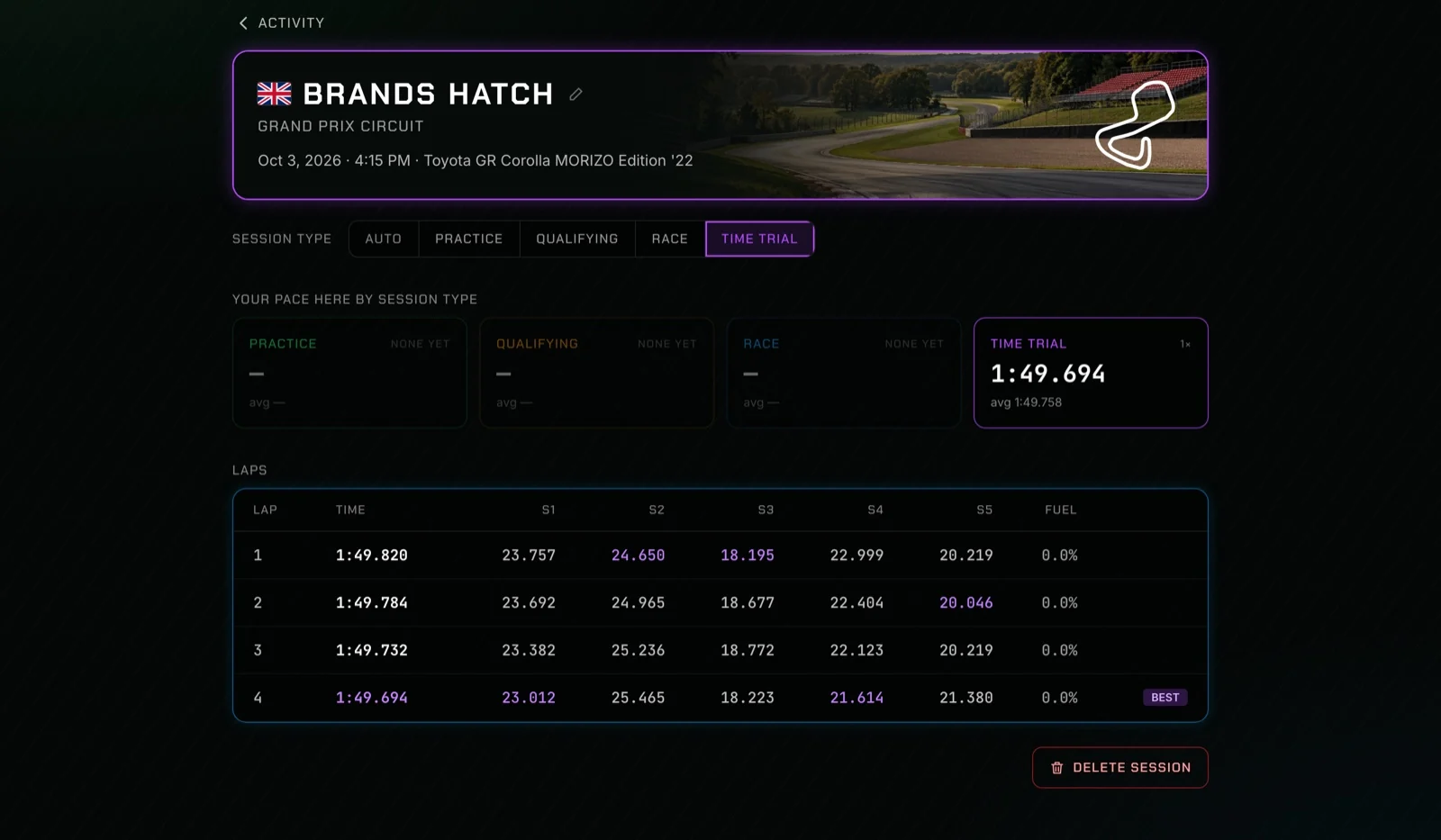
Inside a session, the lap table highlights best laps and sector splits and shows fuel used per lap. Detected pit laps and laps rejected for strong reset or timing evidence are excluded from best-lap records. The app's validity checks are telemetry checks; they should not be treated as a complete replacement for GT7's official penalty or track-limit system.
GT7 lap analysis: compare inputs, racing lines and lost time
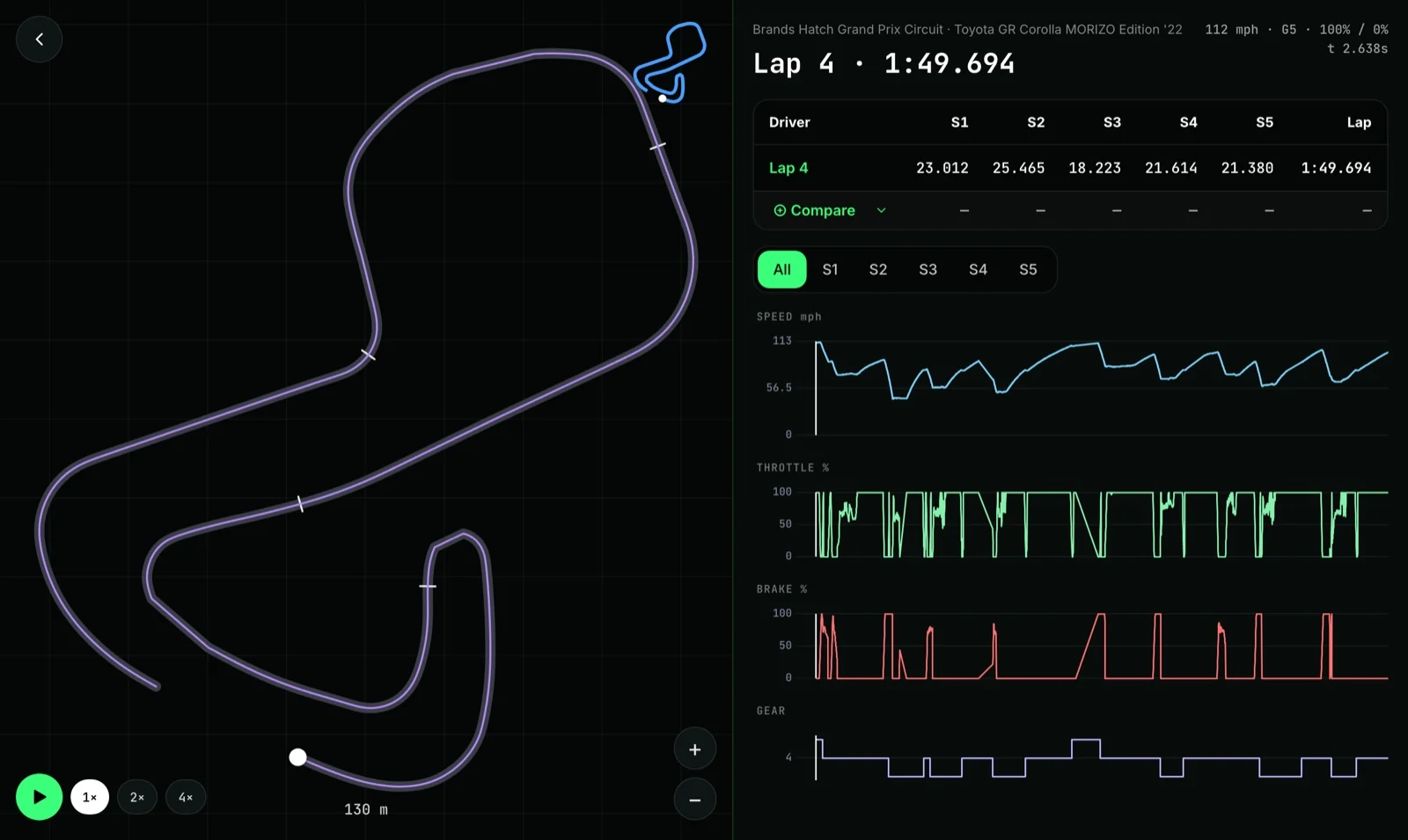
The lap-analysis screen combines a track map with synchronized speed, throttle, brake and gear traces. Playback moves the car along the recorded line at 1×, 2× or 4× speed. Hovering a chart scrubs the map to the corresponding point, so a dip in speed can be examined in the context of the corner where it happened.
You can compare with another recorded lap on the same track, including a lap from a different session. The comparison adds a reference line and car, overlaid traces and sector deltas. This is a ghost of a lap available in your local history; it is not an automatic download of a top leaderboard driver's ghost.
For a useful first comparison, choose two clean laps in the same car under similar conditions. Find the section where the delta grows, then inspect braking, minimum speed, gear and throttle pickup together. Changing one thing on the next run makes the result easier to understand than changing your whole driving style at once.
The current build divides a reference lap into five equal-distance sectors. Those are analysis segments created by Apex North, not the official timing sectors for each GT7 circuit. Track-specific sectors are planned for a later update.
A simple practice loop for improving GT7 lap times
Telemetry is most useful when it helps you test a specific idea. Instead of staring at every chart, use the session table to pick one section and the lap analyzer to find one change worth trying. A faster lap is evidence that the attempt worked under those conditions, not proof that the same change will work everywhere.
- Record a few clean laps to establish a baseline.
- Choose a representative lap and compare it with your best clean lap.
- Locate the sector where most of the time was lost.
- Inspect brake release, minimum speed, gear selection and throttle application there.
- Try one adjustment, record another short run, and compare again.
- Keep fuel, tyres and session conditions similar when evaluating the result.
An offline race engineer that speaks while you drive
Apex North's current race engineer turns structured telemetry events into voice callouts. It can announce lap times, personal bests, sector gains or losses, fuel range, pit windows, tyre-temperature problems, wheelspin, lock-ups, spins and settled race-position changes.
Voice runs locally through Piper text-to-speech, using an installed voice model. Once Piper and the model are configured, speech generation does not require a cloud AI request. The current build still needs that separate setup; bundling Piper and a default voice into an easier installer is part of the distribution work.
You can choose Minimal, Normal, Chatty or Crew Chief chatter levels and switch individual callout categories off. Urgent calls have higher priority, repeated information is suppressed, and routine messages can wait briefly for calmer driving conditions. New uncached phrases can still take a few seconds to generate, which is one of the next performance improvements.
The important distinction is that today's engineer is driven by rules and measured events. A conversational AI that answers questions about your driving or writes a per-corner coaching report is on the roadmap, not a capability we are claiming to have shipped.
Fuel strategy and pit-window estimates
The fuel model uses recent consumption to estimate how many laps remain in the tank and whether a stop is needed. It calculates an earliest, target and latest pit lap with a reserve rather than waiting until the tank is almost empty. When consumption changes, the recommendation can move with it.
The engineer can speak the pit window and call for a stop. When the game is not burning fuel, such as a fuel-off time trial, fuel strategy is suppressed. That keeps meaningless range estimates from distracting you during practice.
These are fuel and estimated performance recommendations, not a complete rules engine for every Sport Mode event. Check the race's required tyre compounds, mandatory stops and other regulations separately. Enough fuel to finish does not remove a mandatory pit-stop requirement.
Tyre temperature is measured; tyre degradation is estimated
GT7's telemetry gives Apex North the temperature of each tyre, but the current data stream does not provide a tyre-wear percentage. The app therefore separates actual temperature readings from an estimated performance trend.
The degradation model examines clean stint lap times, applies a correction for the car getting lighter as fuel burns, and reduces the influence of unusually slow laps. It reports states such as Fresh, Stable, Declining, Poor or Critical, an estimated pace loss and a confidence value.
When confidence is sufficient and a fuel stop is already required, that estimate can bring the planned stop forward within the fuel window. Traffic, mistakes and changing conditions can still affect the trend, so the app should not tell you that your tyres are literally a particular percentage worn or will become fully red on a guaranteed lap.
How the app recognizes GT7 tracks and cars
Cars can be named by looking up the car code reported in telemetry. Tracks are more complicated: the current stream does not provide a simple track ID, so Apex North compares the path you drove with reference lines in its bundled track catalog.
The October 2026 build includes a catalog of 121 layouts and a car list containing 584 entries. Track recognition checks line coverage, length and direction, allowing it to distinguish many reverse layouts and related circuit variants. The catalog is a snapshot and can need updates as the game changes.
Recognition is not perfect. Some layouts lack reference geometry, and layouts that share nearly the same driven line can be ambiguous. Unrecognized tracks get a placeholder name that you can rename from the session page. The current telemetry also does not provide other cars' full data, verified gaps ahead or behind, performance points, or a complete tuning setup.
That boundary guides our product decisions: show what is measured, label what is inferred, and allow a correction when the data cannot establish the answer.
Why we are building Apex North for desktop
A laptop beside a wheel can show a full lap comparison without squeezing it onto a phone. It also gives the driver space for session history and a race-engineer interface while keeping the PlayStation focused on the race.
Under the hood, Rust handles the network stream, telemetry decoding, lap logic, recording and engineer decisions. React and TypeScript render the interface inside Tauri. Recorded sessions and app settings stay on the computer; the core telemetry and voice workflow does not need a hosted account or remote database.
Apex North reflects the same interest in useful local software that drives our other Eleven North projects. We want tools that make the activity easier to understand, with clear boundaries around what the system can actually know.
What comes next, and how to follow the project
The next stage is polish and distribution: reduce voice latency, simplify voice setup, strengthen recognition and timing, and prepare reliable desktop builds. The longer-term direction includes AI lap-analysis reports, spoken coaching, push-to-talk conversations and an optional multi-driver pit wall for leagues.
As of October 4, 2026, Apex North is an in-development Eleven North project. We are not announcing a public installer, a price or an open-source release in this post. If you would like to test the app or hear when a release is ready, use our contact page and mention Apex North, your computer's operating system and whether you play on PS5 or PS4.
Apex North is an independent companion and is not affiliated with Sony Interactive Entertainment or Polyphony Digital. Gran Turismo is a trademark of Sony Interactive Entertainment. Our aim is straightforward: make your own driving data easier to use, one session at a time.
GT7 telemetry and Apex North: common questions
What is Apex North?
Apex North is an in-development Gran Turismo 7 desktop companion from Eleven North. Its current build includes live telemetry, automatic local lap recording, session history, lap playback and comparisons, fuel strategy, and offline race-engineer voice callouts.
Does Apex North run Gran Turismo 7 on a PC or Mac?
No. Gran Turismo 7 runs on your PlayStation. Apex North runs alongside it on a computer and receives telemetry over the same local network. The desktop project is being developed for macOS, Windows and Linux.
Do I need extra hardware for GT7 telemetry?
The connection uses your existing PlayStation, computer and local network. No separate telemetry sensor is required. GT7 must be on track, and your router and firewall must allow the console and computer to communicate.
Can Apex North measure tyre wear in GT7?
It reads tyre temperatures, but the current telemetry stream does not expose a tyre-wear percentage. Apex North estimates degradation from stint lap-time trends, corrects for fuel burn, and reports confidence rather than claiming a measured wear percentage.
Can I compare laps with a leaderboard ghost?
The current comparison feature uses recorded laps available in your local history on the same track, including laps from other sessions. It does not automatically import top leaderboard drivers' ghosts.
Is the race engineer a conversational AI?
Not in the current build. Today's engineer generates callouts from structured telemetry rules and speaks offline using Piper. Conversational AI coaching, push-to-talk and per-corner AI reports are planned features.
Are the five sectors the official GT7 timing sectors?
No. Apex North currently uses five equal-distance analysis sectors based on a reference lap. Track-specific sectors are on the roadmap.
Where can I download Apex North?
As of October 4, 2026, this post does not announce a public installer or commercial release. Contact Eleven North and mention Apex North to ask about testing and release updates.